Litematica - mod for Minecraft
Displays building schematics and helps verify block placement.
Statistics and updates
Download Litematica
The files are hosted by the developer. Choose the game version, downloader and the necessary dependencies on the official page of the project. BlockRadar does not store or repackage these files.
What does Litematica do
Litematica shows a diagram of future construction right in the world of Minecraft. Instead of constantly switching between the drawing and the game, the builder sees the projection of the blocks at the job site.
Projections and schematics
The schema file describes the location of the blocks, and Litematica displays the virtual contour of the structure. You can check the coincidence of the actual construction with the plan, find missing elements and navigate by layers. This is especially noticeable on large buildings and repetitive elements like arches, towers and walls.
Limitations and dependencies
Litematica is not a tool for automatic delivery of materials and does not cancel the rules of the server. Some features require separate libraries, and how you interact with the server depends on the mode version and permissions. Schemes can be made for a different set of blocks or an older version of Minecraft, so porting them requires checking.
How to Build a Complex Building
Download the diagram, match it to the chosen point in the world, and start with the bottom layers. Regularly check the discrepant blocks. On the server, agree in advance on the use of modifications that accelerate the placement, so as not to violate the rules of construction.
Primary source: developer-page.
Screenshots of Litematica
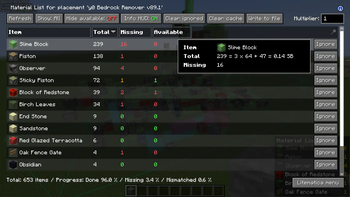
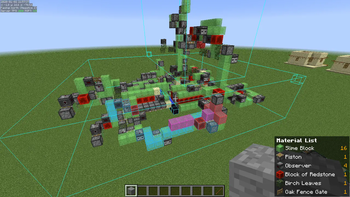
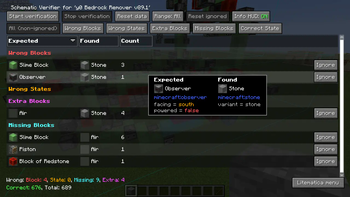
Illustrations: project page.
Libraries and dependencies
If the selected release of this Fabric-mode requires Fabric API, download the compatible library The Fabric API card; installation instructions - cross-hair. Check the list of dependencies of a particular release.
Versions and updates
According to the official source * . To install, choose a release that is compatible with your version of Minecraft.
Latest updates (3)
- 0.29.1 ↗Stable.
fix: loading of Schematica files and Vanilla Templates with multiple palettes refresh stale items after relog clear cache on join Minor "removeBlockEntity" adjust add: 'pasteAlwaysUsePersistent' for leaves fix a few edge cases of invalid Easy Place clicks. add: Pick Stackable entities to Material List. (Mainly to deal with the Cushions) add: Item Frame override for Entities in Material List
- 0.29.0 ↗Stable.
fix sodium compat NOTE: It seems that 26.3 "works" with shaders more or less; minus the texture problem
- 0.28.8 ↗Stable.
fix: NPE while saving Leashable entities without a leash
The latest release on the developer's website ↗ • The full story is with the author of the project.
How to install
- Check out your Minecraft version and mod downloader.
- On the official page, open Versions and select a compatible release.
- Check the author's instructions and dependencies.
- Install the file in the manner specified by the developer and restart the game.
Compatibility varies between releases. Do not use files from unverified mirrors.