Mortar: AI-agent builds buildings and creates datapacks in Minecraft by text request
Mortar’s independent tool manages buildings through AI: preview, undo changes, export schemes and datapacks. How it works with Fabric, Paper and Horizon.
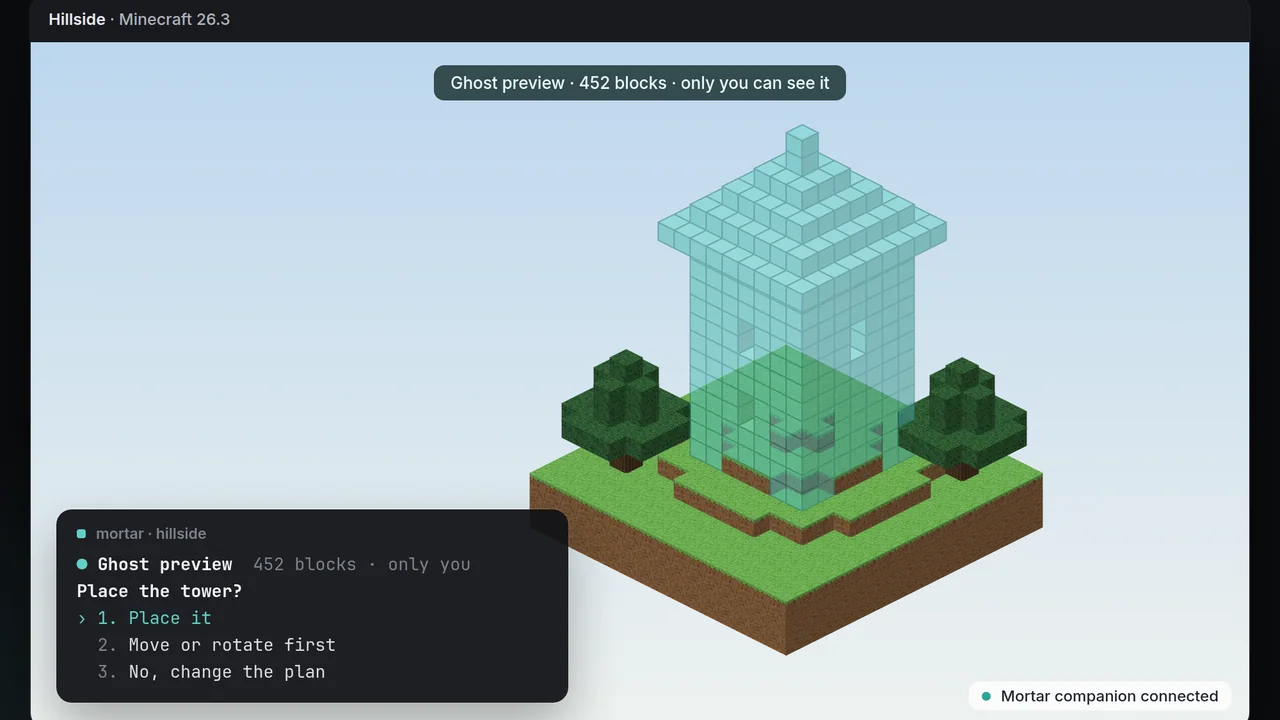
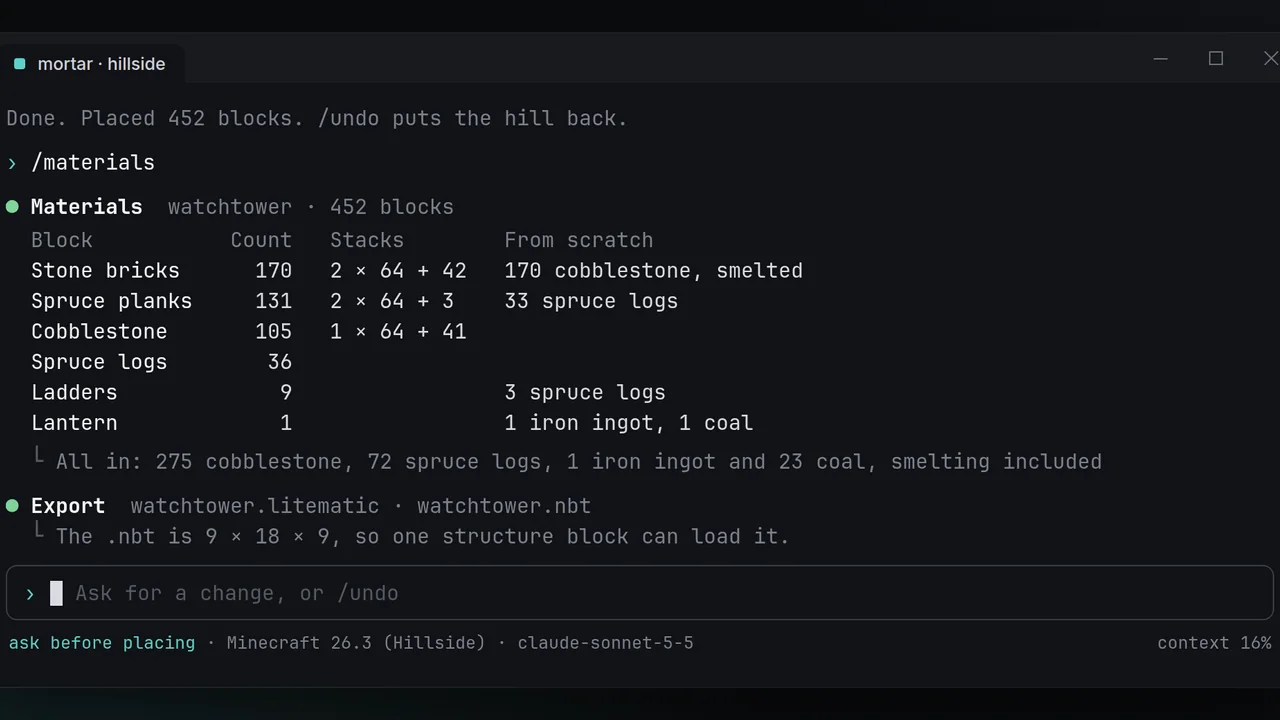
There are more AI tools for Minecraft, but **Mortar** solves a very specific problem: it allows you to describe the future building in plain text, view it in the game world before placing it and only then confirm the changes. The project is open source and works through a terminal agent with a game component.
Important: **Mortar is not a ready-made mod with new items and not a separate neural network inside the game.** It is a world management tool that connects a language model and interacts with Minecraft via a Fabric component, a plugin for Paper, or Horizon's built-in management.
How Mortar builds on demand
The player stands in the right place and launches Mortar. Then you can write, for example, "Build a stone watchtower on a hill, with steps and a roof of spruce." The agent receives data on the terrain, biome and surrounding blocks, plans changes and shows a translucent layout - *ghost preview*.
Before confirmation, the layout can be moved or deployed. Once confirmed, Mortar places blocks. If the result is not liked, the /undo command returns the affected blocks to their previous state, and /redo repeats the action. The developer describes this mechanism as transactions with pictures of the world.
Datapaks, Recipes and Game Rule Changes
Mortar is not limited to architecture, but as the developer describes it, the agent is able to create datapacks: functions, achievements, recipes and tables of extraction. Once generated, it reboots, analyzes errors, and tries to correct incorrect definitions.
**Don't confuse the datapack and the Java mode.** Datapack changes the data and mechanics supported by the game, but it's not the same as creating a full-fledged Fabric or NeoForge mod from the source code. The name of the repository "ai-minecraft-modmaker" does not change this difference.
Construction in Survival and Export Schemes
The /materials team calculates the necessary materials, including the number of mills and processing of raw materials. /export saves the project in .litematic, .schem or .nbt formats - this is convenient for further manual construction or exchange of circuits.
Local Ollama is offered to run the model by default; support for models via Claude, GPT, and Gemini is also announced with proprietary keys. Mortar itself is open and free, but the use of external paid APIs can be charged by their providers.
Compatibility: Fabric, Paper and Horizon
According to the README project, **Minecraft: Java Edition 26.1–26.3** and Minecraft on Rust via Horizon are supported:
- **Single World or LAN* is a Fabric component that is assembled and installed in the mods folder together with Fabric Loader and Fabric API.
- ** The Paper server is a server plugin in the plugins folder; operator rights are required to manage the world.
- **Horizon on Rust** - No separate mod is required: the built-in Agent Control function is used. The preview here opens in a separate window, rather than a semi-transparent design inside the game world.
Fabric and Paper are parts of the same Mortar system, not two independent finished products. Other possibilities Horizon for Minecraft on Rust You can read it in the BlockRadar catalog.
How to Download and Get Started
On GitHub, the author offers an archive for Windows 10/11 with Main.exe and mortar command. The archive is unpacked, the application is launched, and the component is installed for its environment. Rust 1.85+ is needed for self-assembly of the agent, and JDK 25 is needed for assembling Fabric and Paper components.
**Pre-install** check the author's current releases and instructions. The agent's work on a public server is only possible with the permission of the administration and with sufficient rights: the tool does not bypass server protection.
What it means for Minecraft
An interesting idea of Mortar is not just to generate a picture of the structure, but to show the result right in the game, ask for confirmation, save a picture of changes and, if necessary, roll back everything. While this is an independent project, so promise the unmistakable creation of any buildings or support for all versions of Minecraft is impossible.
Source and download: **[Official Mortar repository on GitHub](https://github.com/DolphinStronghold9/ai-minecraft-modmaker)** See other supplements in the fashion-catalogue and server-plugin catalog.