Tectonic is a mod for Minecraft
Changes terrain generation for mountains, valleys and large-scale landscapes.
Statistics and updates
Download Tectonic
The files are hosted by the developer. Choose the game version, downloader and the necessary dependencies on the official page of the project. BlockRadar does not store or repackage these files.
What's Tectonic doing?
Tectonic changes the generation of Minecraft’s natural terrain by adding expressive mountain ranges, valleys and large landscape forms. The world looks different even before it's built.
How geography is changing
The main effect is related to surface shapes and heights. New visual perspectives appear during the study: long ridges, wide valleys and complex height transitions. However, individual biomes and structures may still be defined by other components of the world generator.
Generator compatibility
Fashions interfering in the generation of territories should be selected especially carefully. If there is already a large world explored, the new chunks may be different from the old ones. Combining with another generator or datapack requires checking, otherwise there are sharp joints or unusual arrangement of structures.
Server application
It is better to test Tectonic on a separate world before the start of the new season. Make several routes through different biomes, estimate the load on the generation and then select the parameters of the main world. Changing the generator after opening the server should be planned separately.
Primary source: developer-page.
Screenshots by Tectonic
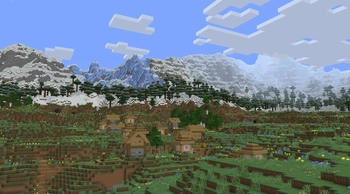
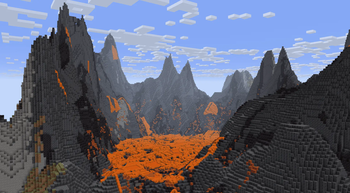
Illustrations: project page.
Versions and updates
According to the official source * . To install, choose a release that is compatible with your version of Minecraft.
Latest updates (3)
- 3.0.32-neoforge-26.3 ↗Stable.
Fix a crash when Remove Frozen Ocean Ice is enabled in the config
- 3.0.32-fabric-26.3 ↗Stable.
Fix a crash when Remove Frozen Ocean Ice is enabled in the config
- 3.0.31-neoforge-26.3 ↗Stable.
Fixed the settings related to the Temperature and Vegetation noises not applying. Reintroduced compatibility with Terralith now that it has ported to 26.3
The latest release on the developer's website ↗ • The full story is with the author of the project.
How to install
- Check out your Minecraft version and mod downloader.
- On the official page, open Versions and select a compatible release.
- Check the author's instructions and dependencies.
- Install the file in the manner specified by the developer and restart the game.
Compatibility varies between releases. Do not use files from unverified mirrors.