Just Enough Items (JEI) – Minecraft Mod
Browse items and crafting recipes.
Statistics and updates
Just Enough Items (JEI)
The files are hosted by the developer. Choose the game version, downloader and the necessary dependencies on the official page of the project. BlockRadar does not store or repackage these files.
What Just Enough Items (JEI) Does
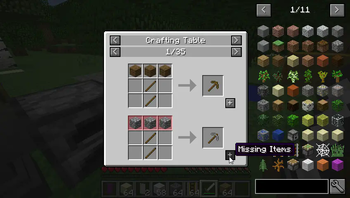
Just Enough Items (JEI) shows crafting items and recipes in a user-friendly interface, including recipes added by established mods.
Recipes without a wiki search
Just Enough Items displays a catalog of available items and how to create them. Instead of guessing about an unknown recipe, you can open the desired item and see the ingredients, and then find out what other recipes it is involved in. On large modpacks, this navigation becomes a working tool: one material is part of dozens of production chains.
Orientation in modpack
JEI is particularly useful when exploring tech and adventure mods, where the standard recipe book doesn’t reflect the full scope of content. The available information depends on the integrations of the mods themselves, so not every special mechanics can be learned through JEI. The recipe directory does not create items or open actions prohibited by the server. If there is no recipe, check the assembly rules and documentation of the specific supplement.
One subject - several routes
Having opened the recipe for the necessary mechanism, you can sequentially go to the ingredients and find out what intermediate materials need to be made. Thus, from an unknown object, an understandable chain of actions is obtained. On servers, recipes are sometimes changed by build, so an external wiki may not show what is available in your game.
Primary source: developer-page.
Just Enough Items (JEI)


Illustrations: project page.
Versions and updates
According to the official source * . To install, choose a release that is compatible with your version of Minecraft.
Latest updates (3)
- 4.24.0.1042 ↗Beta.
Separate per-world state and search configuration while preserving Forge persistence - mezz Separate mod-name formatting settings and tooltip override detection - mezz Separate debug registration from the internal JEI plugin - mezz Use class-local loggers while retaining the legacy logging entry point - mezz Separate plugin registration and timing from client startup - mezz Close startup progress bars when ingredient or…
- 31.14.0.72 ↗Stable.
Close #4558 Allow decorators to override recipe source IDs - mezz
- 4.24.0.1041 ↗Beta.
Remove redundant recipe category sorting - mezz Check API compatibility in the shipped 1.12 jar - mezz Update Russian localization for supported 1.12 labels - makkaor
The latest release on the developer's website ↗ • The full story is with the author of the project.
How to install
- Check out your Minecraft version and mod downloader.
- On the official page, open Versions and select a compatible release.
- Check the author's instructions and dependencies.
- Install the file in the manner specified by the developer and restart the game.
Compatibility varies between releases. Do not use files from unverified mirrors.