Farmer's Delight Mod for Minecraft
Adds new food ingredients, dishes and cooking tools for survival.
Statistics and updates
Download Farmer's Delight
The files are hosted by the developer. Choose the game version, downloader and the necessary dependencies on the official page of the project. BlockRadar does not store or repackage these files.
What does Farmer's Delight do?
Farmer’s Delight expands Minecraft’s agriculture and cuisine by adding products, cooking recipes and themed tools. Mod turns growing food into a separate direction of survival.
Kitchen and groceries
The basic food in Minecraft often boils down to a few quick recipes. Here cooking becomes a process with ingredients, equipment and different types of food. Farms are beginning to provide not only a supply of calories, but also materials for a more varied menu.
Embedding in assemblies
Farmer’s Delight pairs well with agricultural and adventure builds, but the compatibility of optional recipes depends on the integrations installed. Not all popular add-ons are in the mainstream fashion. Before transferring the world, check what additional cultures and blocks will appear and make a backup.
Where to start a farm
Separate the growing ingredients and the cooking area so that the resources don’t mix with a conventional building warehouse. Learn recipes gradually: new products have different ways of getting them. If the server uses its own food system or economy, check the balance of added meals.
Primary source: developer-page.
Screenshots from Farmer's Delight


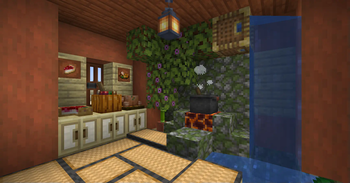
Illustrations: project page.
Versions and updates
According to the official source * . To install, choose a release that is compatible with your version of Minecraft.
Latest updates (3)
- 1.21.1-1.3.4 ↗Stable.
1.3.4 Fixes Fixed a broken behavior when pushing Feasts with Pistons; (1.21.1+) Fixed config "generateFDChestLoot" not properly disabling FD's extra chest loot generation
- 1.20.1-1.3.4 ↗Stable.
1.3.4 Fixes Fixed a broken behavior when pushing Feasts with Pistons
- 1.21.1-1.3.3 ↗Stable.
1.3.3 Fixes Fixed Rope reeling not working if the rope is touching the void layer (minimum build height); Fixed suppressed packet error due to an unsafe property check in TomatoBlock; Fixed Canvas Signs not keeping text color when NBT-copied (such as CTRL + middle-click); (1.21+) Fixed Cooking Pot not comparing data components when merging meal output stacks (deciding to cook, meal slot to output slot etc)
The latest release on the developer's website ↗ • The full story is with the author of the project.
How to install
- Check out your Minecraft version and mod downloader.
- On the official page, open Versions and select a compatible release.
- Check the author's instructions and dependencies.
- Install the file in the manner specified by the developer and restart the game.
Compatibility varies between releases. Do not use files from unverified mirrors.