Cloth Config API – a mod for Minecraft
Provides configuration screens for compatible mods.
Statistics and updates
Download the Cloth Config API
The files are hosted by the developer. Choose the game version, downloader and the necessary dependencies on the official page of the project. BlockRadar does not store or repackage these files.
What is the Cloth Config API?
Cloth Config API is a library for customization screens in modified Minecraft. It provides other mods with tools to create and manage configurations.
The role of the library
Mod writers use pre-made controls instead of writing each settings screen anew. Therefore, Cloth Config often appears in the lists of dependencies. The library itself does not expand the world or create new game items, but without it, individual interfaces of other add-ons may not work.
Why is it important to match versions?
Cloth Config is available for multiple downloaders and Minecraft versions. Coincidence of the name of the library does not mean interchangeability of Fabric and NeoForge files. When updating the build, you need to check the library version with the requirements of the mods using it.
If the mod doesn't start.
Check the download log: A message about a missing Cloth Config API usually contains the necessary version limitations. Install the file for the appropriate downloader. Do not copy several incompatible library options into one mods folder.
Primary source: developer-page.
Cloth Config API Screenshots
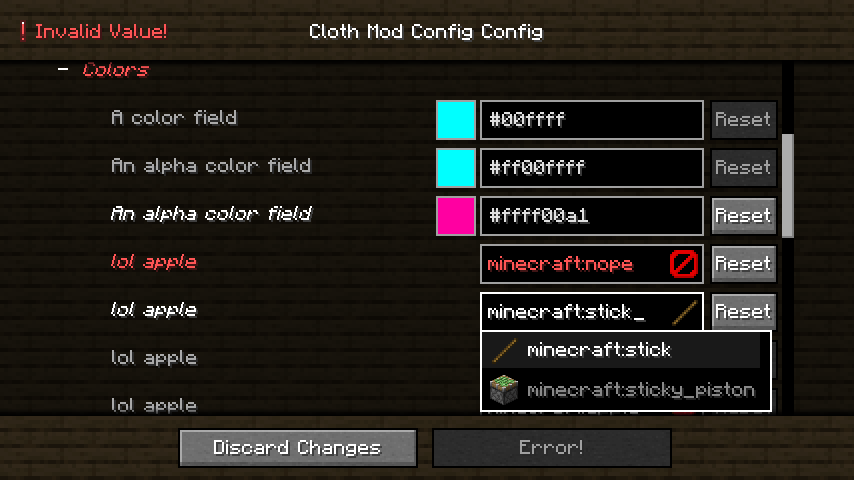
Illustrations: project page.
Versions and updates
According to the official source * . To install, choose a release that is compatible with your version of Minecraft.
Latest updates (3)
- 26.3.159+neoforge ↗Stable.
- 26.3.159+fabric ↗Stable.
- 26.3.158+fabric ↗Stable.
The latest release on the developer's website ↗ • The full story is with the author of the project.
How to install
- Check out your Minecraft version and mod downloader.
- On the official page, open Versions and select a compatible release.
- Check the author's instructions and dependencies.
- Install the file in the manner specified by the developer and restart the game.
Compatibility varies between releases. Do not use files from unverified mirrors.